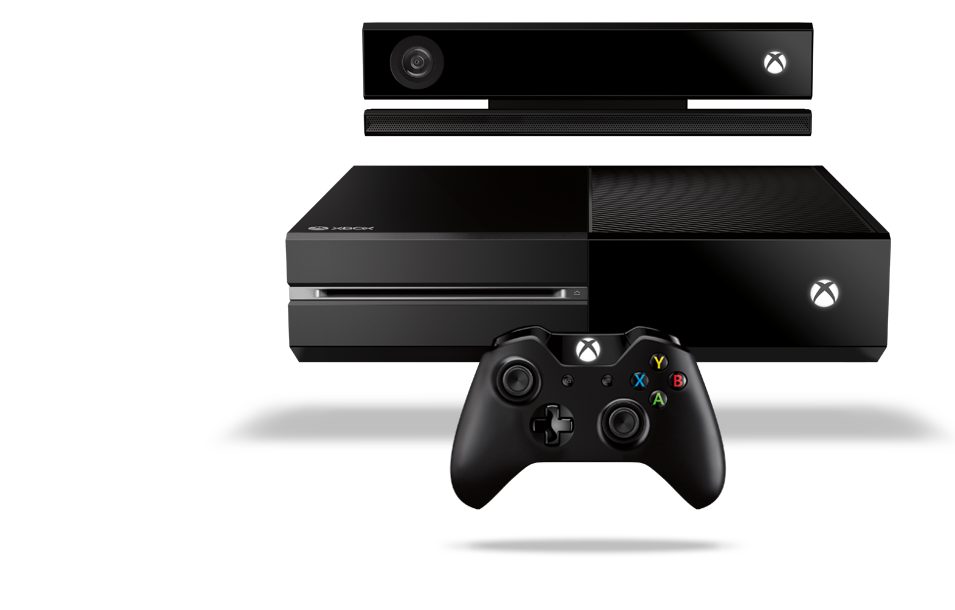
Xbox One
I indulged. I'd been thinking about it for a while and kept saying I didn't need an Xbox One, my Xbox 360 was console enough and anyway, I didn't even play that enough.
That lasted a while until, one day, I found myself walking out a shop with a smug grin on my face and a heavy bag containing and Xbox One console, Titanfall, Forza 5 and Battlefield 4.
 |
| My Xbox One setup |
I love it. It's an amazing entertainment system. I have it hooked up to my sound bar and my TV. Saying "Xbox On" turns the whole lot on and it has boosted what was already a gadget busy living room into an even more "intelligent" one.
I'm not a big gamer, I like to play games occasionally but I rarely ever play online, I'm happy enough playing single player. What I like about the Xbox One is that it is so much more than a games console, which suits me perfectly.
Voice Control
The voice control is incredible, I don't measure it's success but I'd struggle to believe it was less than 98% in my apartment. If I'm watching a loud action movie, it's probably not going to hear me shouting at it, although inevitably if I shout "Xbox Mute", it usually obeys, allowing me to then whisper further commands. I've even sung commands to it "Xboooox Ooonnn" in a booming voice - the bloody thing even understands that. Don't judge me on the singing...
You can control most things on the console with voice control. Even saying "Xbox sign in as Mike" works nicely.
Smart glass
If Voice Control doesn't work, you can't be bothered to use it, or you are watching a loud action movie, then Smart Glass, available on all platforms, is your next best friend. It's a great little app allowing you to control the Xbox from any app, game or just the home screen. I use it on my iPad mini. It's great for using with apps like Youtube or Internet Explorer.
Gestures
Probably firmly in the "novelty" category, the gestures are pretty good but not exactly that quick. You spend much more time waving your arm around, clenching your fist and pushing imaginary buttons than you would need to using a controller, smart glass or your voice, but they are at least fun.
I use the gestures to browse through films in Netflix sometimes, which is actually a great use for it.
Sky
Routing my Sky+ box through the Xbox is great. I can go from a game to Sky in seconds, I can snap sky to the side of a game i'm playing or webpage I'm browsing (or vice versa). The picture quality seems to be just as good through my TV and it just brings everything together.
Figuratively One
It's just a name. A brand, if you like. I needed a Working Title for my projects. It just feels neater that way. It gives me a logo to use with my projects and a consistent theme to stick to.

There is no particular reason for the name but if any of my projects take off in any way, it'll be the brand name for that project.
Time
One of the problems I face with Figuratively One, is how much free time I have, or rather, when I do get free time, having the energy to do anything. Working in the Technology industry means that when I need some downtime, I tend to want downtime away from programming of any kind.
 |
| Figuratively One: Rosie Home Automation |
Maybe I should focus my efforts on building a time machine ... or a way to increase energy after a hard day at work?
Raspberry Pi
My production Raspberry Pi is working really well. The Rosie home automation system has had a face lift (sample on the left) in line with the Figuratively One brand and is working brilliantly. I can snap Rosie onto the Xbox whilst watching TV and control the lights using gestures, Smartglass or a controller too.
The voice control module is currently offline. I need a separate Pi to run both for reliability and sound performance reasons. I have a second Pi but it's linked up to some motors at the moment so I'm dawdling and procrastinating. Voice Control is working well with Rosie though so once I get round to it, I'll be able to turn my lights on and off once again using my voice. Rosie for lights, Xbox for entertainment - sorted.
Technology
Apple MacBook Air and the Microsoft Surface
Microsoft have announced the Surface Pro 3, which apparently is targeted less at the iPad and more at the MacBook Air.

I own a MacBook Air and I like it. I went through an HP Netbook and Microsoft Surface RT before landing on the MacBook Air and I'm sorry to the Apple haters but, it's the best laptop I've ever owned. It just works. It wakes up immediately, it lasts 10 hours, it operates silently, it's light and it's fast/powerful.
I'm able to do my work on it from anywhere and as Apple computers are much more popular these days, I have no compatibility issues. If I did have, I could install Bootcamp and run windows on it.

When I owned the Surface (albeit an RT model), it was a very nice looking device, it was actually a great size for a tablet and I really wanted it to be the right device for me, but I found, very quickly, that I was forcing myself to use it, rather than using it because it was the right device. Needless to say, just a few weeks into owning it, I had sold it.
If I had to choose between paying ~£800 for a MacBook Air or a Surface Pro.... I'd find it difficult to justify the Surface. You just can't use the Surface as a fully functioning computer, unlike the MacBook Air.
Windows still have some ground to make up in my opinion.
That said, it seems as though they are heading in the right direction, so maybe the Surface 4 or 5 will be cheaper and will close the gap. Oh, and they should get rid of RT, that is so restrictive, it's just not worth using.

No comments:
Post a Comment